Artificial intelligence has democratized visual creation. Just a few years ago, generating a high-quality, complex, or conceptual image required specialized software, a lot of money, or being an expert digital artist. Today, all that has changed. The latest gem to arrive is Nano Banana, an AI image generator that is not only free and open source but also uniquely integrates directly into your Google Chrome browser.
Forget about downloading heavy programs or registering on complicated platforms: Nano Banana puts the ability to generate digital art in the place where we spend most of our time: the web.
For the curious or the novice in the world of Artificial Intelligence, tools like Nano Banana represent the ideal starting point. It's a way to experiment with the power of prompts (the text instructions you give the AI) without technical barriers. If you can type text into your browser, you can create art with Nano Banana.
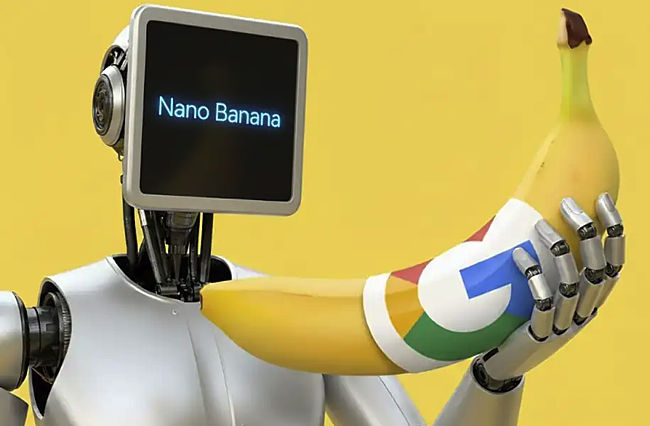
What is Nano Banana and Why is it a Game Changer?
Nano Banana is not just another image generator. It is an extension that relies on existing diffusion models but does so in a way that optimizes speed and accessibility within the Google Chrome ecosystem.
The real novelty of Nano Banana is its integration with the browser. Previously, to use generative AI, you had to:
- Go to a website: Like Midjourney or DALL-E, which often have free usage limits or require subscriptions.
- Install local software: Like Stable Diffusion, which requires a powerful graphics card and technical knowledge.
Nano Banana eliminates those obstacles. You simply add the extension to Chrome, and you can start writing your idea and seeing it brought to life. Its focus is on simplicity and immediacy, making the "text-to-image" process as fast as a Google search.
First Steps: Quick and Simple Installation
Like any Chrome extension, installing Nano Banana is an intuitive process that will take you less than a minute.
1. Locate the Extension
Open the Chrome Web Store and search for "Nano Banana." Make sure you are installing the official version, which usually has thousands of users and good ratings. This step is similar to adding any other tool to your favorite browser.
2. Add and Pin
Click the "Add to Chrome" button. Once installed, a small icon (a conceptual image related to AI) will appear in your browser's toolbar. If it doesn't appear, click the puzzle icon to find it and "pin it" for direct access.
3. Open the Generator
Clicking the Nano Banana icon will open a small window or a side tab (depending on the version and update) that will be your workspace. You will see a text box for your prompt and sometimes some basic style options.
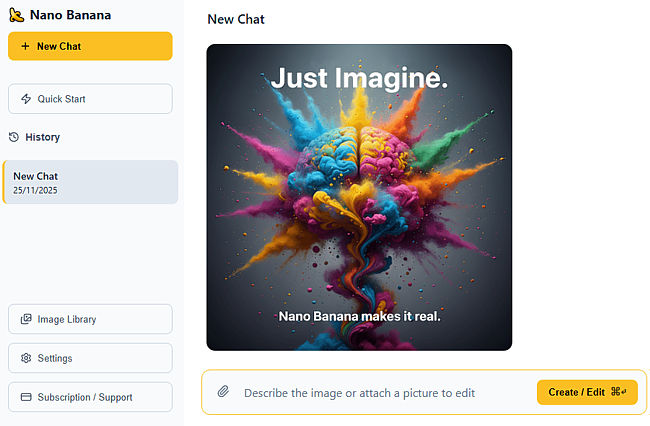
The Art of the Prompt for Novices
The prompt is the key to any AI generator. It is the instruction you give the machine, and the more detailed it is, the better the result will be. For a beginner in Nano Banana, here is a quick guide to creating powerful prompts:
1. The Main Subject (What do you want?)
Be specific about the central element. Don't just write "dog." Write: "A Siberian husky dog wearing sunglasses."
2. The Style (How do you want it?)
This is the fun part. Define the artistic mood. Use terms like "digital art," "oil painting," "cyberpunk style," "soft watercolor," or "pencil sketch."
- Example: "A Siberian husky dog wearing sunglasses, oil painting, impressionist style."
3. The Details (Where and How?)
Add context, lighting, and background. Lighting is crucial for the atmosphere.
- Example: "A Siberian husky dog wearing sunglasses, oil painting, impressionist style, sitting in a Parisian cafe under dim light."
4. Magic Words (The Quality)
To ensure the AI strives for quality, always add terms at the end that reinforce technical perfection, such as "high resolution," "intricate details," "8K rendering," or "professional photography."
- Final Prompt: "A Siberian husky dog wearing sunglasses, oil painting, impressionist style, sitting in a Parisian cafe under dim light, intricate details, digital masterpiece."
When using Nano Banana, you will realize that experimentation is your best teacher. Play with styles and don't be afraid to be absurd; often, the strangest ideas produce the best images.
Advantages of Using Nano Banana in the Browser
Integration with Chrome offers several advantages that distinguish it from other platforms:
- Speed and Convenience: You don't have to switch windows. You are browsing an inspiration blog or an art gallery, and if an idea pops up, you can generate the image instantly with a single click on the extension.
- Workflow: It is ideal for professionals or hobbyists who use their browser to research and design. If you are a web developer at Neobox and need a quick banner, it's right there.
- Freeness and Accessibility: Being a free tool, it eliminates the economic barrier for anyone who wants to venture into visual AI.
The use of free and accessible tools like Nano Banana is transforming the way we think about digital content. It allows small businesses, students, or simply enthusiasts to create professional visual content without large investments.
What Can You Create with Nano Banana? (Ideas to Get Started)
The potential is almost infinite, but here are some practical ideas you can apply today, perfect for a novice user on Neobox:
1. Illustrations for Your Blog or Social Media
Instead of using generic stock photos, you can create a unique conceptual image for an article. If you write about "cloud security," you can generate: "A gold padlock floating in digital clouds, dramatic lighting, conceptual art style."
2. Personalized Wallpapers
Create your own high-resolution wallpaper for your mobile or computer. Try prompts that define specific landscapes or textures, such as "Foggy forest at sunset, Japanese illustration style."
3. Simplified Icons and Logos
For mockups or drafts, you can quickly generate ideas for icons or logos before passing them on to a professional designer. For example: "Icon of an abstract letter N with neon lights, minimalist dark background."
4. Personal Conceptual Art
Simply for fun and experimentation. Describe a dream, a scene from a book, or a crazy idea you have. It's an excellent way to practice your prompt writing skill and understand how the AI thinks.
Limitations and the Future of AI Extensions
Like any free, browser-based tool, Nano Banana has some limitations:
- Variable Quality: Although it generates very good images, it may not achieve the technical perfection of paid models like Midjourney at their highest resolutions or in character consistency.
- Control Options: Extensions usually offer less control over advanced parameters (such as seeds, or the weight of certain words) than full desktop or web interfaces.
However, the trend is clear. AI is increasingly becoming an integrated feature of our everyday tools, not a separate application. Tools like Nano Banana demonstrate that, very soon, the ability to generate visual content will be as integrated into our workflow as text correctors or translators are today.
For the Neobox team and anyone who uses Chrome, Nano Banana is more than just an extension; it is an invitation to creativity without traditional barriers. Download it, experiment with simple prompts, and discover the digital artist within you.