Technology advances without asking, and last October 2025 marked a decisive turning point for millions of users around the world: the end of official support for Windows 10. For most, this meant a difficult crossroads: migrate to the controversial Windows 11 or stick with an operating system that would no longer receive security patches. What Microsoft did not anticipate was the magnitude of the third path chosen by users: the great leap towards the world of free software.
In this scenario of uncertainty, a Linux distribution has stolen the show, proving to be the ideal alternative for novices: Zorin OS, which has surpassed one million downloads in just five weeks.
This milestone is not just an impressive figure; it is a clear indicator that the operating system landscape is changing drastically. The success of Zorin OS is due to the fact that it was specifically designed to make the transition from Windows to Linux as smooth as possible. The statistics are overwhelming: more than 70% of new downloads come from former Windows users, who are desperately looking for a platform that is familiar, secure, and does not require them to buy new equipment.
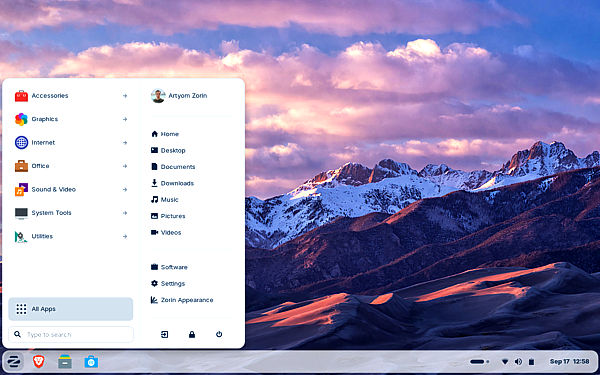
The Great Exodus: Old Hardware, New Requirements
To understand this phenomenon, we must recall the conditions imposed by Microsoft. Windows 11 arrived with quite strict hardware requirements, especially the need for a TPM 2.0 chip (Trusted Platform Module) and recent processors. This decision excluded millions of computers from the update that, while old, are still perfectly functional. For many users, the choice was simple: either pay for a costly hardware upgrade or risk using Windows 10 without the necessary security protection.
This is where Zorin OS comes into play. The team behind this platform understood that the main barrier to entry into the Linux world was not just the learning curve, but the perception that free software is only for experts. Therefore, they designed an operating system that not only has modest hardware requirements (it runs on equipment with as little as 1 GB of RAM) but also feels and looks like the Windows their users have used for decades. The migration of these more than 780,000 Windows users to Zorin OS in such a short period is proof that, faced with imposition, the end user prefers freedom and functionality.
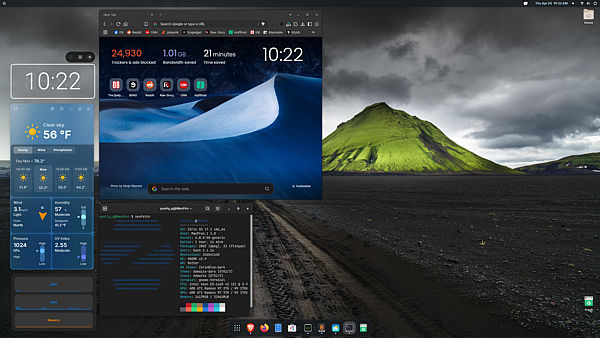
Zorin OS: A Linux with a Windows Look (and Much More)
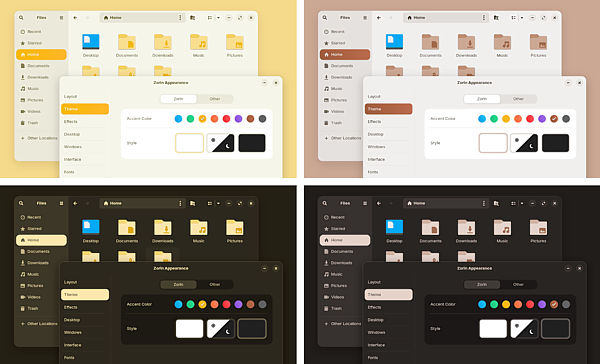
If you have ever considered trying Linux but were intimidated by the idea of a command-line interface or a confusing desktop, Zorin OS is the answer. Its star feature is the "Zorin Appearance" tool. This application allows users to change the desktop layout with a single click, imitating designs that faithfully replicate the look of Windows 7, Windows 10, or even macOS. For a user who has been using the start menu and the taskbar at the bottom for twenty years, the adaptation is almost instantaneous.
This visual familiarity eliminates the main barrier for the novice. You no longer have to learn a new visual language. The goal of the system is not to reinvent the wheel, but to offer the strengths of Linux (security, speed, and gratuity) under a "disguise" that is comfortable and familiar. In addition to its intuitive interface, Zorin OS has worked hard on its stability and overall performance, even on the most humble hardware. Users who migrated from Windows 10 report a notable improvement in boot speed and general system response, revitalizing equipment that Microsoft had sentenced to obsolescence.
Overcoming the Software Barrier: Compatibility and Applications
Historically, the great obstacle to Linux adoption has been compatibility with proprietary applications such as Microsoft Office or Adobe Photoshop. Zorin OS has addressed this problem from multiple angles:
- Native Office Support: The system comes pre-installed with the LibreOffice office suite, which allows you to open, create, and edit Word, Excel, and PowerPoint documents without any problem.
- Running Windows Apps: Thanks to the integration of Wine (a compatibility layer), Zorin OS allows users to install and run many native Windows applications directly. Although compatibility is not 100%, the most common applications, and even many games, work perfectly.
- Integrated Web Apps: Zorin OS 18, the version that has driven the migration, includes the "Web Apps" feature. This tool allows you to convert any web application (such as Google Docs, Office 365, Teams, or Canva) into a desktop application with its own icon in the start menu. This perfectly integrates browser-based solutions, facilitating the use of business and creative tools without relying on local installation.
The combination of these solutions ensures that most users will not miss their old work environment. Whether you need to work with documents or manage your email, Zorin OS offers a robust and, most importantly, fully functional alternative right out of the box.
Security and Privacy: The Hidden Advantages of Linux
Beyond the friendly interface, the fundamental reason for migrating to Linux has to do with security and privacy. Linux, due to its open-source architectural design, is inherently more resistant to viruses and malicious software. While Windows is the main target of most cyberattacks, the need for antivirus in Zorin OS is drastically reduced, making it faster and safer by default.
Furthermore, in an era where data collection (telemetry) is a constant concern, Zorin OS is positioned as a defender of privacy. The operating system does not collect personal data from its users. This contrasts sharply with the practices of technological giants and offers invaluable peace of mind to those who value their online anonymity. The transparency of the open-source code allows anyone to audit the system to verify its commitment to privacy.
Long-Term Stability: The Promise until 2029
Another turning point for Windows 10 users, who were facing obsolescence in 2025, is the guarantee of stability. Zorin OS 18 is a Long-Term Support (LTS) version that ensures security updates and patches until the year 2029. This eliminates the pressure of having to change the operating system or hardware every few years, providing a perspective of continuity and savings in the medium term.
For the novice user who simply wants their computer to work without problems, without intrusive messages, without unwanted advertising, and without fear of viruses, Zorin OS represents a respite. Its success of more than one million downloads is a clear message to the industry: users are looking for software that respects their hardware, their privacy, and their wallet. If you have a PC that was left behind by the Windows 11 requirements, or are simply looking for a faster and more secure alternative, giving Zorin OS a chance, especially its free Core version, could be the best technological decision you make this year.
The end of Windows 10 is not the end of your PC; it is the gateway to a faster, safer, and more adapted free software ecosystem tailored to your real needs.
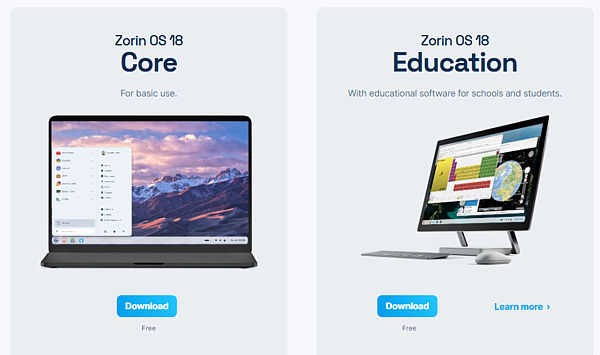
The Zorin OS 18 download is available at the link below, including the free and paid versions: the Core edition, the generic one for all types of users; the Education edition, specific for educational projects; and Zorin OS Pro, a paid version for those who want extra customization and available applications, technical support, and, mainly, to support the project.
https://zorin.com/os/download/
--- ## Meta Etiquetas para Zorin OS: The Operating System That Resurrects Your PC ### Inglés * **Meta Descripción (Meta Description):** > Zorin OS tops one million downloads after the end of Windows 10. Discover how this Linux distribution with a familiar interface resurrects old PCs and offers maximum security. * **Meta Tags (Keywords):** > Zorin OS, Windows 10, end of support, Linux migration, Windows 11, Windows alternative, operating system, free software, Neobox Studio --- El artículo de Estudio Neobox está completo en su versión en inglés. ¿Desea que preparemos un post para redes sociales basado en este artículo o pasamos al contenido de **La Vida es Arte**?